Loading...
Disclaimer: This was written in 2019, some information might be outdated.
I recently asked NodeJS one question, "What are you and how do you work?"
Node => I am a Javascript runtime built on Chrome's V8 engine and use an event-driven, non-blocking model that makes me lightweight and efficient and famous :)
Ok, in simple words it allows us to run Javascript outside of the browser (main application: server-side scripting). NodeJS relies on other libraries and APIs which provide Javascript a platform(or an interface) to execute.
NodeJS = V8 + Libuv + Some Low Level APIs.
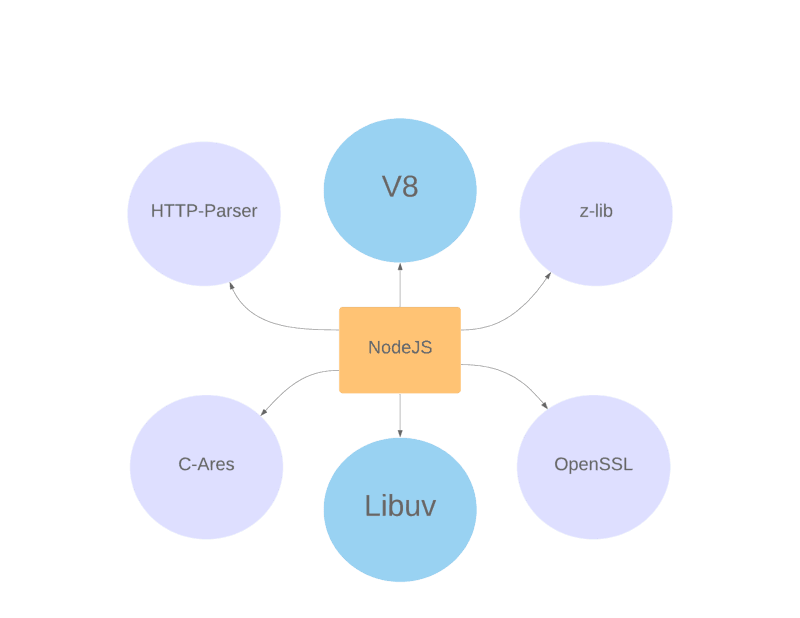
Out of which, V8 and Libuv are two most important dependencies for NodeJS.
1. V8
V8 is a JS engine for Google Chrome and NodeJS written in C++ (a multithreaded program).
Note: A Javascript engine is a program or an interpreter which executes JavaScript code.
Other popular JS engines include:
- Spider Monkey - Firefox
- Chakra - Edge
- Javascript Core - Safari
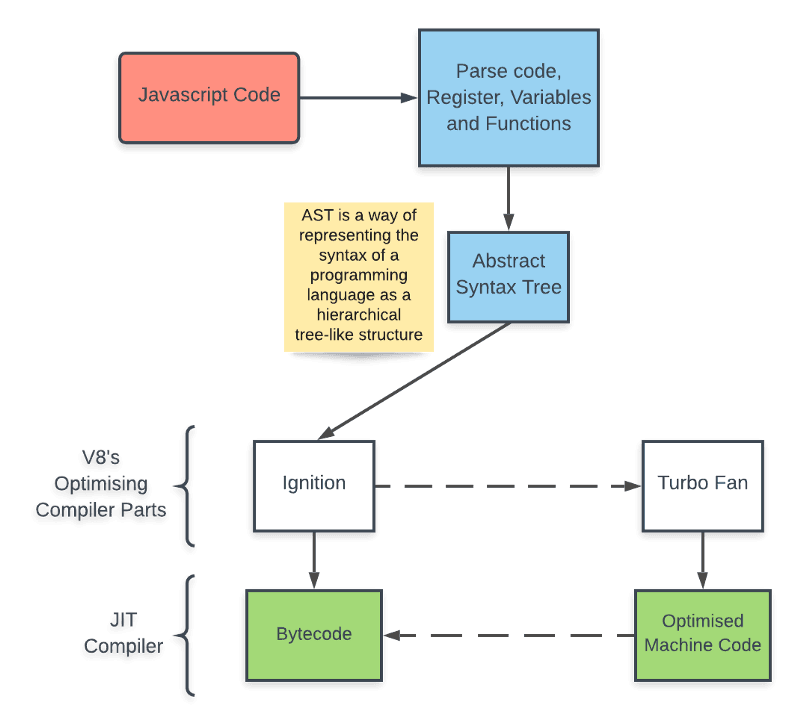
V8 is more efficient than other engines as it translates JavaScript code into more efficient machine code instead of using an interpreter. It compiles JavaScript code into machine code at the execution by implementing a JIT (Just-In-Time) compiler.
2. Libuv
Libuv is a C library which gives NodeJS access to the OS file system, networking, and concurrency. It is used to abstract non-blocking IO operations across all supported platforms. Most importantly, it includes a thread pool for offloading work for some things that can’t be done asynchronously at the operating system level (More details Later). You can check out all its dependencies on Github.
NodeJS connects its C++ side with JS side using an internal function named process.binding(). So, our JS code is wrapped in C++ and combined with helper libraries to write server-side scripting. But, how does it work? What does it mean by event-driven?
function startNodeScript() {
   myScript.runContents(); // Whole Code
   while(pendingWork) {  // Event Loop
       waitForWorkToComplete;
   }
}
startNodeScript();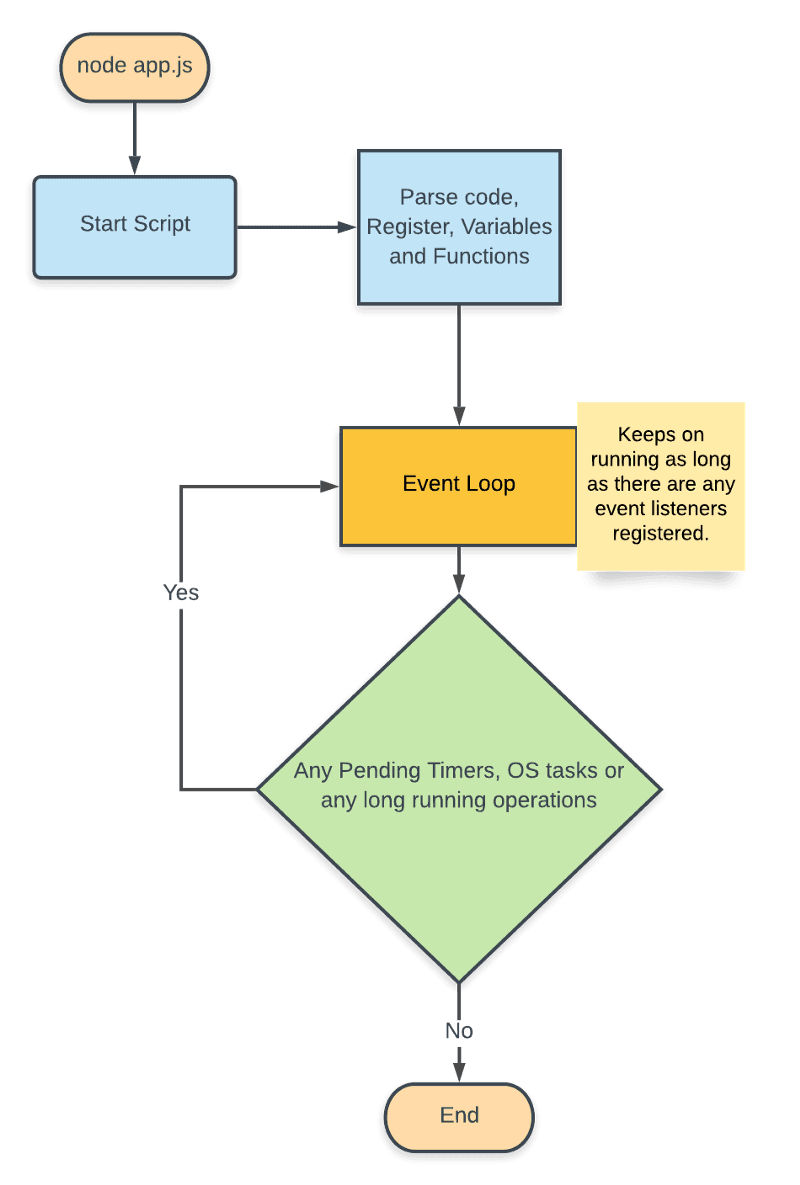
Consider this example,
console.log("First");
setTimeout(function() {
   console.log("Third");
}, 0);
console.log("Second");
Output,
First
Second
Third
Here, the event loop ran all the code first and then looked for any pending timers.
Now, what is this event loop?
Before moving on, let’s deal with one question: Is NodeJS single-threaded or multi-threaded?
- NodeJS on the outside is single-threaded (Event Loop)
- NodeJS on the inside is multi-threaded
What???
Remember, NodeJS is built on C and C++ libraries and libuv provides a thread pool (Maintains Multiple Threads).
Note: Thread is the smallest unit of processing that can be performed in OS. NodeJS provides 4 threads as default which can be modified easily.
Here, the Event loop (single-threaded) is a control structure that decides what our thread should be doing at any one point of time, it performs “non-blocking” IO operations by offloading operations to system kernel whenever possible. Consider a NodeJS program using built-in module crypto which has a lot of CPU intensive tasks as it deals with algorithms performing data encryption and decryption.
Note: crypto.pbkdf2 is an async function
const crypto = require('crypto');
const start = new Date();
crypto.pbkdf2('secret', 'salt', 1000000, 64, 'sha512', (err, derivedKey) => {
if (err) throw err;
   console.log(new Date() - start);
});
The time taken for this function is around (in ms):
820If we add the same function again,
const crypto = require('crypto');
const start = new Date();
crypto.pbkdf2('secret', 'salt', 1000000, 64, 'sha512', (err, derivedKey) => {
if (err) throw err;
   console.log(new Date() - start);
});
crypto.pbkdf2('secret', 'salt', 1000000, 64, 'sha512', (err
The output instead of being 1600ms for the second function is:
822
824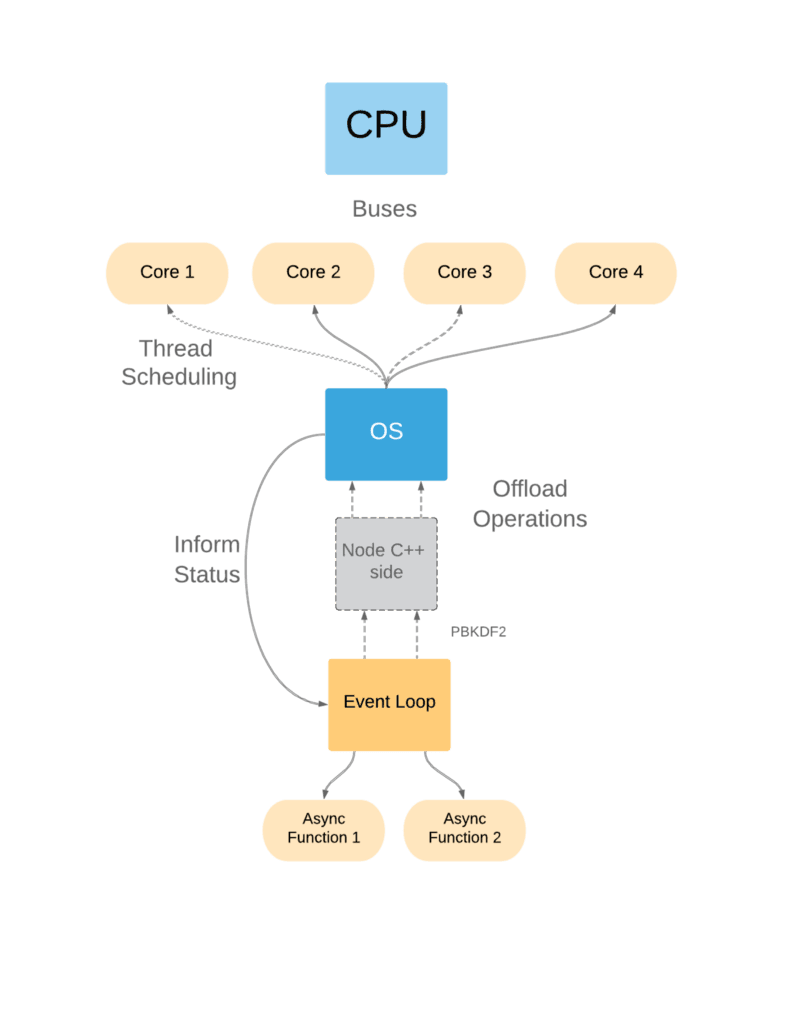
Now, try to understand what happened here:
- Event Loop parsed the whole code and found two async functions and registered them.
- Pbkdf2 is implemented in C++ internally, so NodeJS offloaded this function to one of its C++ threads available.
- Again the same operation arrived, which is again offloaded to one of other threads available.
- Now, my processor has more than one core which handles two threads separately and informs the event loop that the task is done.
Note: A core is part of a CPU that receives instructions and performs calculations, or actions, based on those instructions.
What would happen if we used the synchronous method of pbkdf2?
const crypto = require('crypto');
const start = new Date();
const hash1 = crypto.pbkdf2Sync('secret', 'salt', 1000000, 64, 'sha512');
console.log(new Date() - start);
const hash2 = crypto.pbkdf2Sync('secret', 'salt', 1000000, 64, 'sha512');
console.log(new Date() - start)
The output is:
823
1637
Here, the time increased for the second function. So, I guess you got a pretty good idea of the phrase "Don’t block the Event Loop".
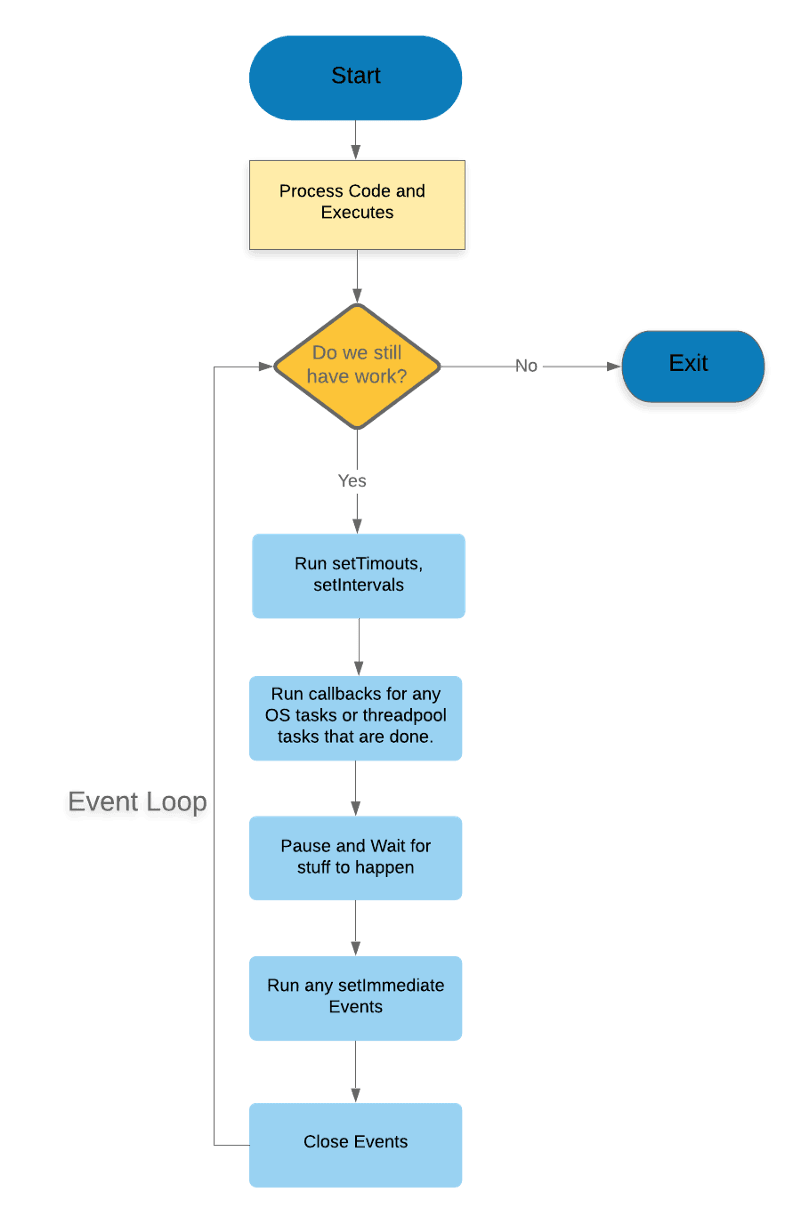
Now, the Event loop can be summarized as:
- Run all timers in the queue called using setTimeout and setInterval.
- Executes Pending IO callbacks and other OS Tasks such as crypto.
- Take a Break and let stuff to happen.
- Retrieve new I/O events; execute I/O related callbacks (almost all except for close callbacks, the ones scheduled by timers).
- Run any setImmediate() callbacks (It is also a timer but runs after other processing).
- Close Callbacks, e.g. socket.on('close'), res.on('end') etc.
- Repeat.
Conclusion
This post breaks down the definition of NodeJS and tries to cover every aspect behind the science of NodeJS. Starting with:
- Javascript Runtime (V8)
- Event-Driven
- Non-Blocking Model
- Efficiency and Light-weight